![Forney_FV_logo_signature_600.jpg]](https://knowledge.forneyonline.com/hs-fs/hubfs/Forney_FV_logo_signature_600.jpg?height=40&name=Forney_FV_logo_signature_600.jpg)
How to use Preload
- At the machine, navigate to the Compression section
- Ensure the Preload checkbox is enabled
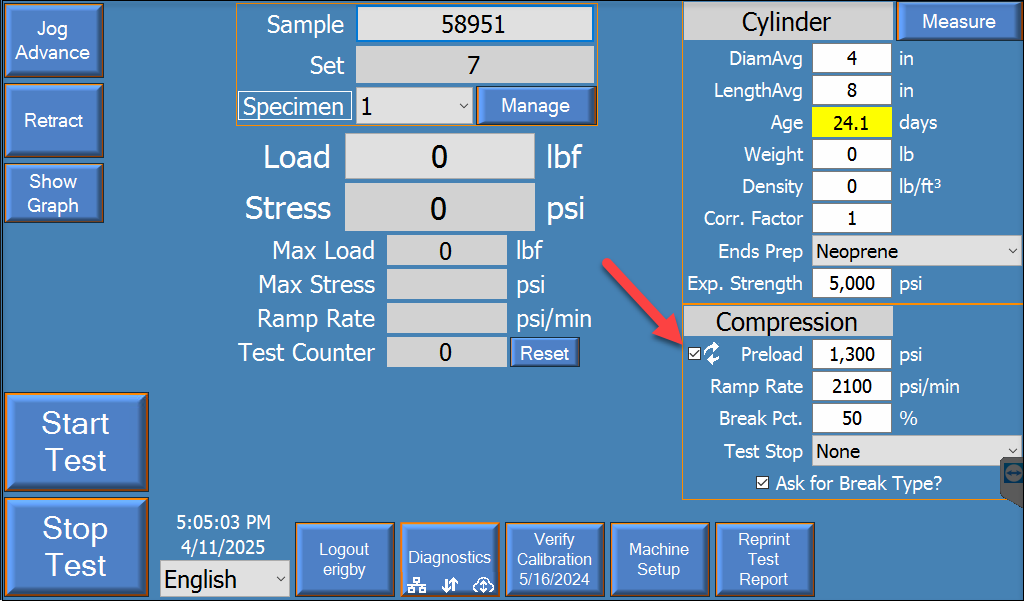
- Leave Auto Preload enabled for all tests where available
How Auto Preload is calculated
First specimen in a set
For specimens younger than 28 days:
- Expected strength = 55% of 28-day design strength
- Preload = 50% of expected strength
Example:
- 28-day strength = 4,000 psi
- Expected strength = 2,200 psi
- Preload = 1,100 psi
Second specimen in the set
- Preload = 50% of the actual strength of the first tested specimen
Third specimen and beyond
- Preload = 50% of the average strength of previously tested specimens in the set
This allows preload to adjust to actual material performance during testing.
Summary
Preload determines when the test begins and when data is recorded.
Using Auto Preload ensures:
- Proper specimen seating
- Controlled loading at the start of the test
- Consistent and repeatable results across all specimen types
Need Help?
If you have any questions or need assistance, our team is here to help.
Visit the support page to:
-
Submit a support request
-
Access additional resources
-
Get help from our team