![Forney_FV_logo_signature_600.jpg]](https://knowledge.forneyonline.com/hs-fs/hubfs/Forney_FV_logo_signature_600.jpg?height=40&name=Forney_FV_logo_signature_600.jpg)
Notes:
-
A lab must be selected before Truck Tickets can be accessed.
Accessing Truck Tickets
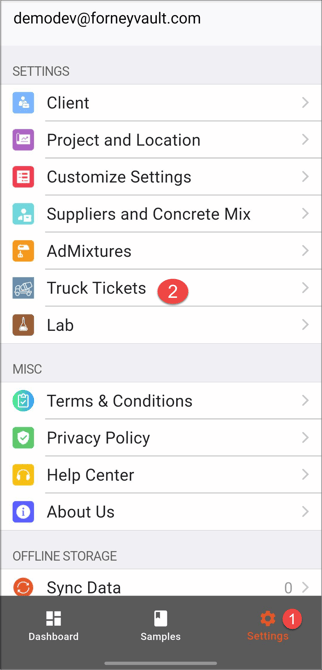
- Log in to ForneyField
- Tap Settings
- Tap Truck Tickets
Creating a Truck Ticket
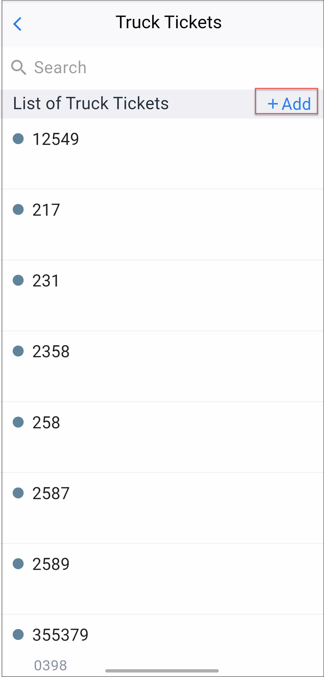
- Open the Truck Tickets page
- Tap +Add
- Enter the required truck ticket information
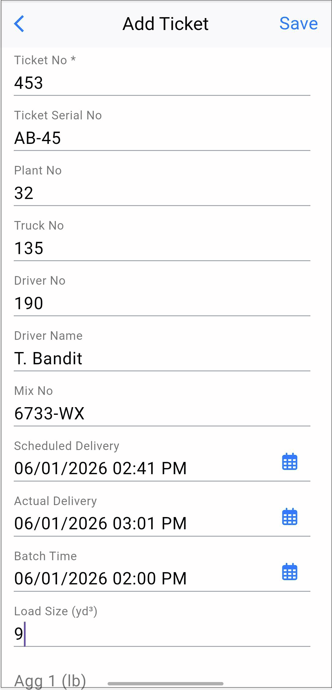
- Tap Save to record your changes.
The Truck Ticket will immediately be available in both ForneyField and ForneyTools.
Editing a Truck Ticket
- Open the Truck Tickets page
- Select the Truck Ticket you would like to edit
- Update the required information
- Tap Save
Need help?
Our support team is here to help you get started:
Phone: 724-346-7400
Toll-Free: 800-367-6397
Email: support@forneyvault.com