![Forney_FV_logo_signature_600.jpg]](https://knowledge.forneyonline.com/hs-fs/hubfs/Forney_FV_logo_signature_600.jpg?height=40&name=Forney_FV_logo_signature_600.jpg)
Requirements
Before starting, confirm the following:
-
Your Android device and Zebra printer are connected to the same network
-
You have the printer IP address
-
You have the Zebra Browser Print.apk file downloaded to your device
- Download here: Zebra Browser Print for Android
Step 1 - Get the Printer IP Address
-
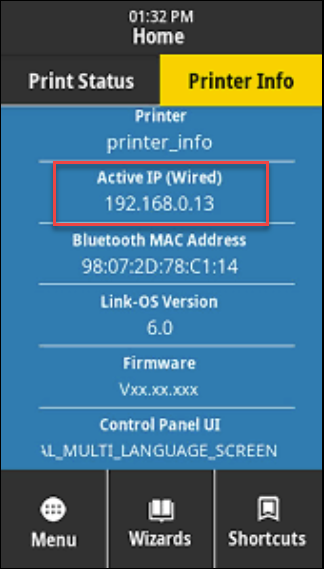
On the Zebra ZT231 touchscreen, tap Menu.
-
Select Printer Info.
-
Locate the IP Address listed on the screen under network information.
Step 2 - Install Zebra Browser Print.apk on Android
-
Open the downloaded Zebra Browser Print.apk file on your Android device.
-
If prompted, allow installation from unknown sources.
-
Complete the installation.
-
Open the Zebra Browser Print app.
-
When prompted, allow Notification Permissions.
Step 3 - Add the ZT231 in Zebra Browser Print
-
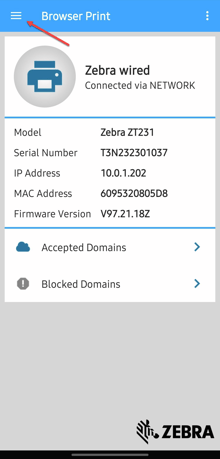
Open Zebra Browser Print.
-
Tap the three lines in the top right corner.
-
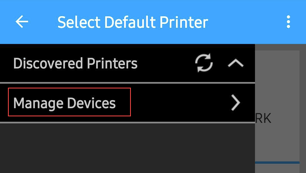
Select Manage Devices.
-
Tap the plus button in the bottom right to add your printer.
-
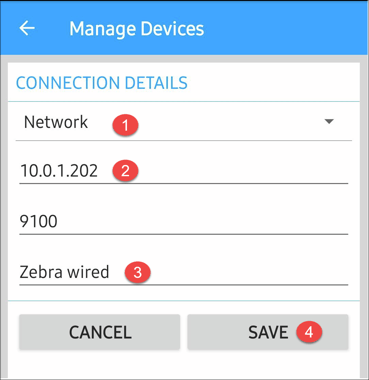
In the ManageDevices Page
- Select Network to select he connection type.
- Enter your printer IP address
- DO NOT change the Port Number
- Select your Printer's local name.
- Select Save to Add your perinter.
Step 4 - Connect in ForneyTools
-
Log in to ForneyTools.
-
Navigate to Print Labels.
-
When prompted by Zebra Borwser Print, allow the browser to connect to Zebra Browser Print software.
-
Once connected, the page will display:
Printer is Ready
You can now print specimen labels directly to the Zebra ZT231.
Troubleshooting
If the printer does not show as ready:
-
Confirm the Android device and printer are on the same network
-
Verify the IP address was entered correctly
-
Confirm Notification Permissions are enabled
-
Restart the Zebra Browser Print app
-
Power cycle the printer if needed
Need Support?
Email: support@forneyvault.com
Phone: 724-346-7400