![Forney_FV_logo_signature_600.jpg]](https://knowledge.forneyonline.com/hs-fs/hubfs/Forney_FV_logo_signature_600.jpg?height=40&name=Forney_FV_logo_signature_600.jpg)
- In ForneyTools, select Alerts > Configuration.
- Select Create.
- Select the Project the alert will apply to.
- For Type, select Specimen Not Received.
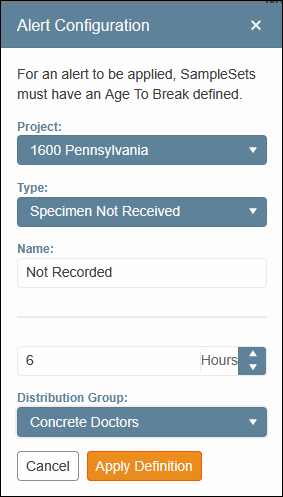
- Enter a Name for the alert.
- Enter the number of Hours before the alert should be sent.
- Select the Distribution Group that should receive the alert.
- Select Apply Definition.