![Forney_FV_logo_signature_600.jpg]](https://knowledge.forneyonline.com/hs-fs/hubfs/Forney_FV_logo_signature_600.jpg?height=40&name=Forney_FV_logo_signature_600.jpg)
Instructions:
- Log into the ForneyLink® interface.
- Navigate to Machine Setup.
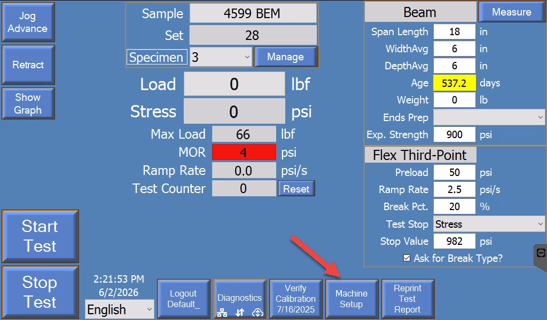
- Select Adjust Speed.
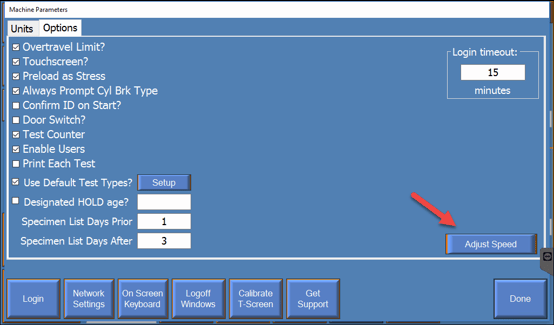
- The Adjust Machine Speeds window will appear.
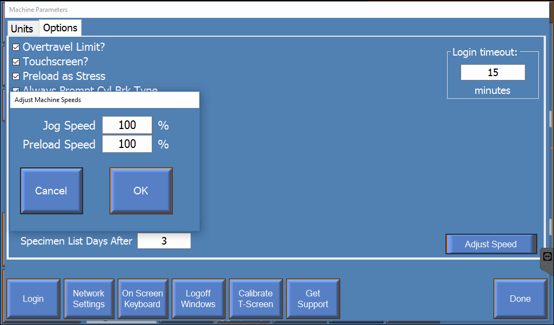
- Enter the desired values for:
- Jog Speed (%)
- Preload Speed (%)
- Select OK to save the changes.
Jog Speed
-
Jog Speed controls how quickly the machine moves when using the Jog Advance control.
-
Lower values provide finer control when positioning the specimen against the platen.
Preload Speed
-
For some test types, Preload Speed controls how quickly the machine advances toward the preload value after a test is started.
-
Once preload is reached, the machine transitions to the loading procedure defined by the selected test type.
Additional Information
-
The default value for both Jog Speed and Preload Speed is typically 100%.
-
Adjusting Preload Speed does not change the preload value itself.
-
For some test types, the Preload value defines when test data recording begins and is not included in the recorded test data.
-
Lower speed settings may be useful when testing mortar or grout cubes, rock cores, beams, or other specialty specimens that require more precise positioning.
Need help?
Our support team is here to help you get started:
Phone: 724-346-7400
Toll-Free: 800-367-6397
Email: support@forneyvault.com